
Online registration, import and export of contact lists
Part 3 – Online registration, import and export of contact lists
The following pages may be less interesting if you have been using Message Express for some time.
We end with these pages because most of the topics covered here are handled by Telmatik's technical support team when implementing Message Express for new customers.
Online registration of contacts via the widget
As mentioned earlier, you can add one contact at a time using the Add button.
With Message Express, contacts can also sign up to receive your message by simply adding a widget that we provide. The term widget is a contraction of the words window and gadget. It refers to a small application that can be integrated into a web page and, in this case, allows users to subscribe to your alerts and notifications sent via Message Express.
Our widget is programmed so that, once added to your site by your website integrator, it can match your website's appearance. We can add your municipality's or organization's logo, and change the colours of the following elements: buttons, headers, input fields and background colour.

The widget is almost identical to the content presented when clicking Add from the Message Express interface. However, contacts signing up via the widget must agree to the terms and conditions and complete a captcha, as seen above, for security purposes. The widget has been designed to allow contacts to be geolocated when they add their address to the interface. A map is used to validate their position.
Some configuration choices are possible with this registration interface. These can be accessed via the Widget link at the top of Message Express.
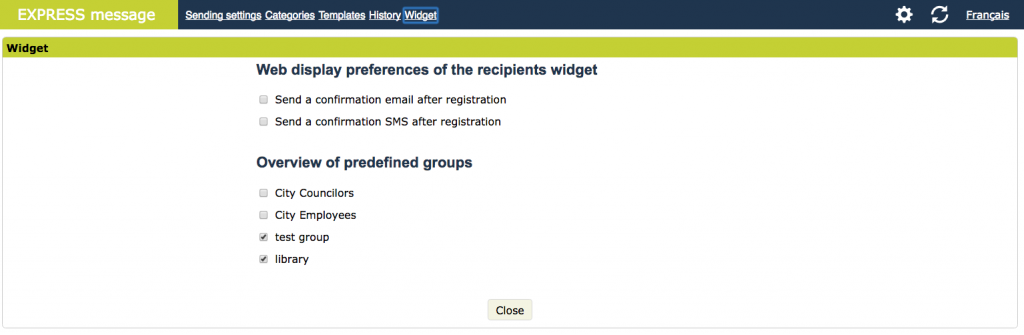
These preferences include the display of groups that contacts can join when they register online. In short, groups can be made visible in this registration interface or not. In the image above, you can see that new contacts who sign up will see the groups you have displayed (this list is the same as the one in the Predefined groups tab).
It is also possible to have a registration confirmation email and/or text message sent automatically to new contacts who register. And of course, it is also possible to import and export hundreds and thousands of contacts at a time.
Also, you can allow contacts to join groups. You may even show certain groups (to online contacts) and hide the rest.
Of course, there are situations when you may also need to Upload a file containing a list of several hundred or more contacts at once.